This article addresses an issue where SYSPRO users receive a "Role UI Files Being Copied" information message after logging into SYSPRO (as seen in below screenshot). The error typically results from a client/server synchronisation problem per Operator & PC. If you log in with the same operator on a different PC, you don’t get the error message, if you log in as a different operator on the problematic PC, there’s also no error. When the user is prompted with the screen and the user clicks Retry, the SYSPRO program will close. If the user clicks on Cancel, then the SYSPRO program will load as normal and the user can proceed to work in SYSPRO.
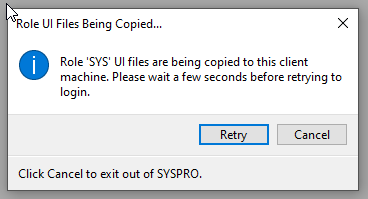
SYSPRO creates a temporary file for the synchronization process. The filename is 'ClientCopyInProgress.txt'. This file is deleted once the syncing is completed, so if this file exists in the client folder, it means SYSPRO did not complete the synchronization. A similar error message can occur when the client screens have not synced properly—in that case, the 'ClientCopyInProgress.txt' file will exist in the Screens folder.
Resolution:
- Navigate to the Local Settings folder by opening File Explorer.
- Go to the following directory: C:\SYSPRO8Client\Base\Settings\Role_SYS
- Locate the file named ClientCopyInProgress.txt and delete this file.
- Open SYSPRO again and the error should no longer appear.
Was this article helpful?
That’s Great!
Thank you for your feedback
Sorry! We couldn't be helpful
Thank you for your feedback
Feedback sent
We appreciate your effort and will try to fix the article